Toggle Nav

Tamron Announces TAMRON Lens Utility™ Version 5.0 Update
February 19, 2026
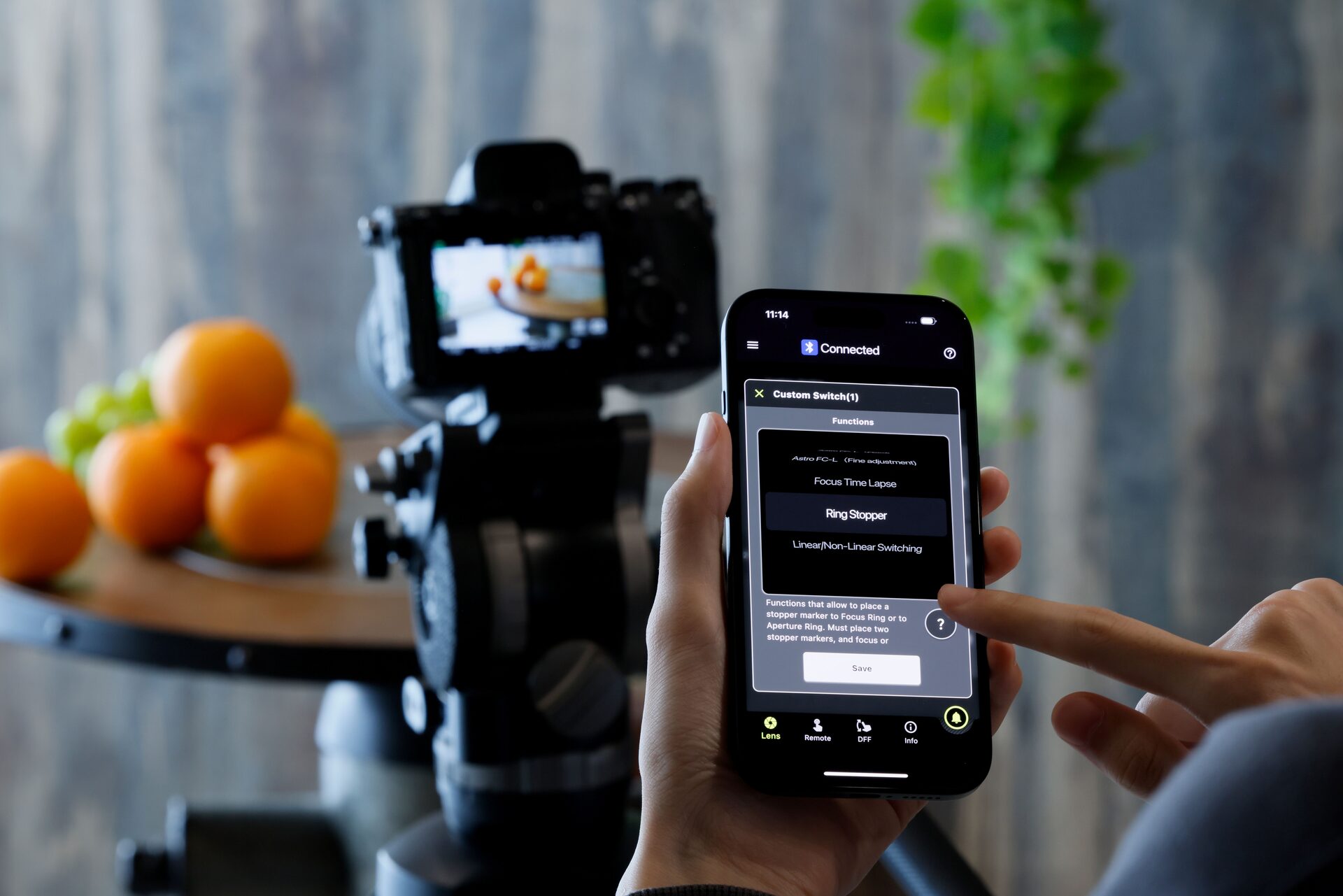
February 19, 2026 – Tamron is pleased to announce a major update to its dedicated support application, TAMRON Lens Utility™, designed to enhance both video and still photography workflows.
The new Version 5.0 introduces a range of additional functions and improvements to existing features, offering photographers and videographers a more comfortable, intuitive and creative shooting experience.
The update will be available for download starting Thursday, 19 February 2026, for both mobile and PC platforms.
TAMRON Lens Utility™ Ver. 5.0 Now Available
Application Name: TAMRON Lens Utility™
Download Start Date: February 19, 2026
Compatible Operating Systems
Mobile Version
-
iOS 16–18
-
Android OS 6.0–16
PC Version
-
macOS 13–15
-
Windows 11 (64-bit)
New Features in Version 5.0 (Mobile Version)
TAMRON Lens Utility™ Ver. 5.0 introduces powerful new tools to support greater precision and flexibility when shooting:
Focus (FC) / Iris Marker Link
Markers can now be set on both the focus ring and aperture ring, allowing instant shifts to preset positions with a single tap via the Digital Follow Focus (DFF) screen.
Ring Stopper
An electronically controlled stopper can be set for focus and aperture rings, helping prevent unintended adjustments and enabling smoother, more accurate operation.
Adjustable Rotation Angle
Users can now select the rotation angle of the focus and aperture rings, allowing manual operation to better match different shooting styles and creative needs.
Focus Time Lapse
This feature works with a camera’s interval shooting function, enabling time-lapse videos while gradually shifting focus position automatically.
Astro Focus Lock (Fine Adjustment)
Designed for night sky photography, this function allows users to fine-tune and save focus positions for more efficient astrophotography shooting.
Night Mode
A red, dimmed display mode reduces eye strain in low-light environments and helps minimise disturbance to others when shooting at night.
Download Links
iOS Version:
https://apps.apple.com/app/id6746462774
Android Version:
https://play.google.com/store/apps/details?id=jp.co.tamron.lensutility.mobile
PC Version (Download & Installation Instructions):
https://www.tamron.com/global/consumer/support/download/lensutility/
Important Notes for Users
Connection Requirements
Depending on your device, the following accessories may be required:
-
iOS devices: TAMRON-LINK (Model TL-01)
-
Android devices: TAMRON-LINK or Connection Cable USB-C to USB-C (Model CC-350)
-
PC (Windows/macOS): Connection Cable USB-A to USB-C (Model CC-150) or USB-C to USB-C (Model CC-350)
TAMRON-LINK and connection cables are sold separately.
Firmware Updates
Lens firmware updates are not supported through the mobile version. The PC version must be used for firmware updating.
Compatible Lenses
A full list of compatible lenses is available here:
https://www.tamron.com/global/consumer/soft/lensutility/#compatible_lenses
Firmware updates supporting Version 5.0 for certain lenses are scheduled for release in Spring 2026, including:
-
28-75mm F/2.8 Di III VXD G2 (Model A063) for Nikon Z mount
-
35-150mm F/2-2.8 Di III VXD (Model A058) for Sony E-mount
Supporting Creativity Through Innovation
With Version 5.0, TAMRON Lens Utility™ continues to expand the creative possibilities available to photographers and filmmakers, offering enhanced control, improved usability and new tools designed for real-world shooting environments.

Share on Facebook

Share on X

Share on Pinterest
Comment(s)
Recent Posts

| September 30, 2026